
Insights
Building a Smart Frontend with Next.js and Gemini
The modern web demands more than just static content; users expect intelligent, responsive interfaces. By combining the rendering power of modern React frameworks with advanced natural language processing capabilities, developers can build interactive frontends without relying on a heavy traditional backend.
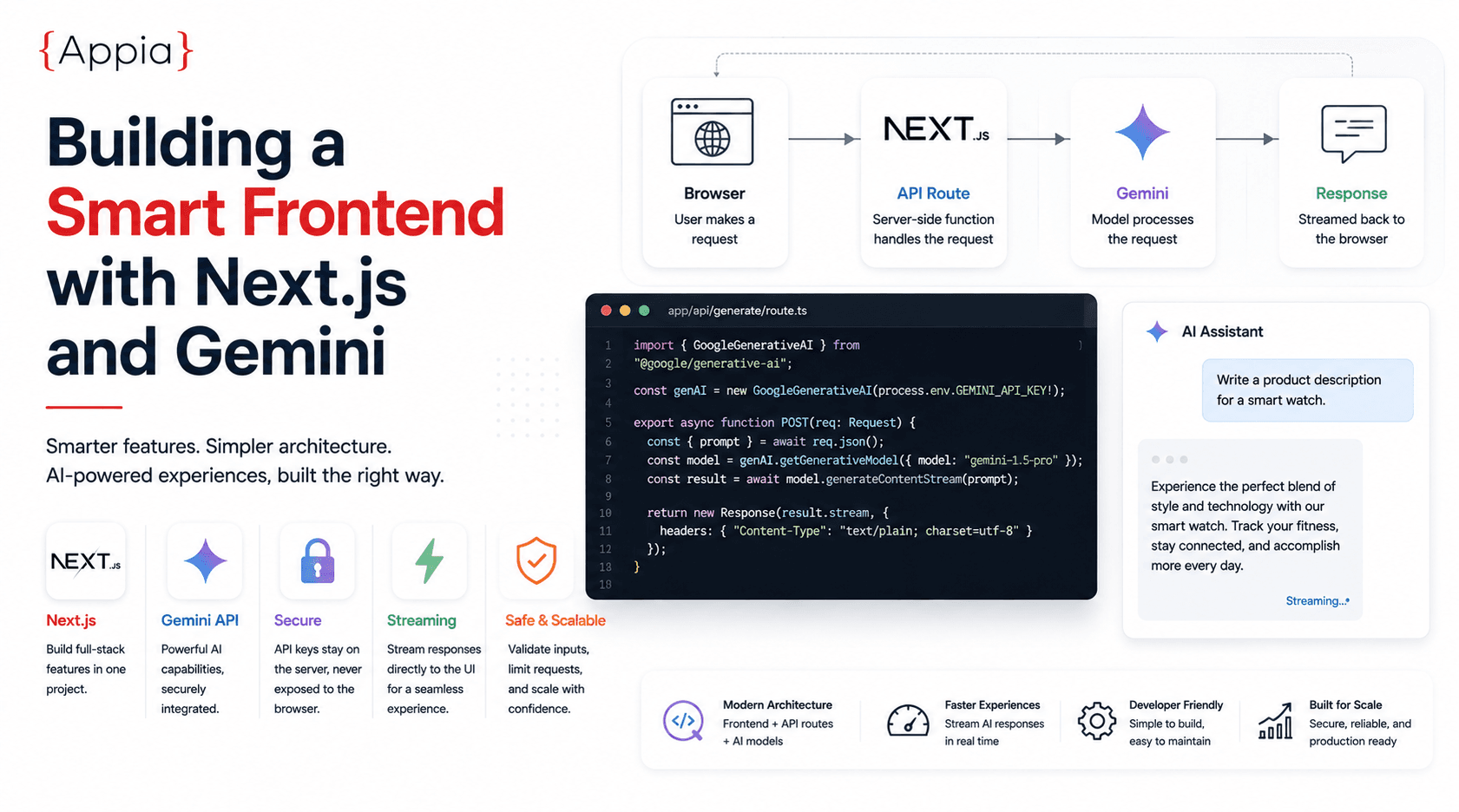
Why frontends are getting smarter without heavier backends
Modern web architecture doesn't need a monolithic backend to add AI features. When designing modern web architectures, the heavy lifting of a single API call can often be handled directly through a framework's own API routes or edge functions — keeping the interface fast and the infrastructure simple.
Why Next.js fits this pattern well
Next.js allows you to build API routes alongside your frontend code, in the same project. That makes it straightforward to securely call external APIs, like Gemini, without ever exposing a secret key to the client browser. The request flow stays simple: browser calls your API route, your API route calls the model, the response streams back.
Getting started
To begin, make sure your environment has the latest dependencies installed, along with the official SDK for whichever model provider you're using. Set your API key as a server-only environment variable — never prefix it so it's exposed to the browser. Once that's configured, you can stream responses directly into your UI components.
What this unlocks
Once the plumbing is in place, streaming responses directly to UI components makes it straightforward to generate dynamic product descriptions, summaries, or content snippets on the fly — without a page reload or a separate loading screen that breaks the flow.
Where to be careful
The API route pattern is simple, but it's easy to skip rate limiting or input validation on the route itself since it "just calls Gemini." Treat your API route like any other endpoint: validate what's coming in, and put a rate limit on it before it ships, not after.
A concrete request flow, step by step
Walk through what actually happens on a single request: the browser submits a form or a prompt, the client calls your Next.js API route, the route validates the input and attaches the server-side API key, then calls the model provider. The response streams back through the route to the client, rendering token by token instead of waiting for the full response. Nothing in that chain needs a separate service — it's the same deploy as the rest of the app.
Choosing between streaming and a single response
Streaming is worth the extra plumbing for anything a user is actively waiting on — chat interfaces, long-form generation, summaries of something they just uploaded. For short, fixed-format outputs, like a single classification label or a short tag suggestion, a single non-streamed response is simpler to implement and test, and the latency difference isn't noticeable enough to justify the added complexity.
Handling errors and rate limits gracefully
Model APIs fail in ways a typical REST API doesn't: rate limits, content filtering rejections, and occasional timeouts on longer generations. Build the UI to expect these from day one — a retry affordance, a clear message when a request is filtered, and a timeout that falls back to a normal error state instead of a spinner that never resolves. Treating these as edge cases to add later usually means shipping a feature that looks broken the first time a rate limit gets hit in production.
Caching what doesn't need to be regenerated
Not every AI-generated response needs to be fresh on every request. If the same input reliably produces content you're happy reusing — a product description generated from a fixed set of attributes, for instance — caching the result avoids paying for and waiting on a regeneration every time the page loads. This is one of the simplest cost controls available, and it's often skipped simply because it wasn't part of the original build.
Testing an AI feature before it ships
Standard unit tests don't cover the real risk with an LLM-backed feature, which is variability in the output itself. It helps to keep a small, versioned set of representative prompts and manually review how the model handles them whenever the prompt or model version changes — catching a regression in tone or accuracy before users do, rather than after.
When it's time to move past a single API route
A single API route calling a model directly is the right starting point for nearly every AI feature. It stops being enough once you need to orchestrate multiple calls with conditional logic between them, maintain conversation state across a session, or call several different tools in sequence — at that point, the pattern shifts from "one API route" to something closer to an agent, and it's worth designing that deliberately rather than layering it onto the original route.
Deploying without surprises
Deployment for this pattern is usually no different from deploying the rest of a Next.js app — the API route ships alongside everything else, and most hosting platforms handle serverless functions for API routes without extra configuration. The one thing worth checking explicitly: confirm your hosting platform's function timeout is long enough for the model responses you're generating, especially for longer, non-streamed outputs, since a default timeout tuned for typical API calls can cut off a slower generation before it finishes.
Picking a model isn't a one-time decision
Model choice for a given feature is worth revisiting periodically rather than treated as fixed at launch — providers update pricing, latency, and quality often enough that a model that made sense six months ago may not be the best fit today. Keeping the model call isolated to a single function or route, rather than scattered across the codebase, makes that kind of swap a small change instead of a larger refactor.
If you're building an AI-powered feature and want a second opinion on the architecture before you commit to it, talk to us.